Passio GO!
- 4.0
- Rating
- 100.00K
- Installs
- Free
- Price

 Analysis by App-foxy
When several people in the same household depend on buses or other local transit, the difficult part is often not finding a route once. It is coordinating the small decisions around it: who is leaving first, whether someone should wait at the stop, and how to check the next vehicle without asking another person to search on their behalf. I found Passio GO! most useful in that everyday space. It is an Auto & Vehicles app from Passio Technologies Inc that focuses on live transit information rather than becoming a general travel planner.
My first impression was that it works best as a practical reference on a shared routine. One person can check a vehicle before leaving home, another can look again while walking to the stop, and a student or older relative can use the same basic information without needing a complicated account arrangement. That simplicity is valuable, but it also means the app should be viewed as a transit locator, not as a complete household coordination system.
How Passio GO! fits into a shared household routine
I’d make Passio GO! part of a household routine by agreeing on one simple check-in habit: confirm the route, direction, and stop before anyone leaves, then share only the detail another person needs. That keeps the app useful without turning every trip into a running status report. Next, I’d consider how to keep that routine practical when people use different phones or travel at different times.
You May Also Like

 Google Keep - Notes and lists
Google Keep’s Quiet Growth Shows the Appeal of Simpler Notes
As mobile work gets busier, Google Keep keeps winning a simple contest: capture a thought quickly, find it later, and get on with the day.

 Blood Strike: 2.5 Anniversary
Blood Strike’s Loadouts Turn Every Drop Into a Tactical Gamble
A close look at Blood Strike’s custom loadouts: how fast access to signature weapons reshapes its battle royale rhythm, rewards preparation, and narrows the gap between fights.

 Pandora - Music & Podcasts
Pandora’s Music Is Easy to Start, but Harder to Recover
Pandora’s strength is its low-effort path from a seed to a station. Its weak spot is how much confidence it asks you to place in connection, setup, and quiet recovery.

 8 Ball Pool
 Is Built on Rivalries, Rematches, and Routine
A close look at the rivalries, rematches, shared routines, and unanswered safety questions that turn a quick pool match into a persistent mobile community.

 Samsung Music
’s Quiet Strength Is Playing What You Already Own
Its reach comes less from spectacle than from dependable access to a personal library. That simplicity is both the app’s strongest retention engine and its ceiling.

 AccuWeather: Weather Radar
AccuWeather Review: A Quick, Clear Forecast for Everyday Decisions
For everyday plans, the best forecast is the one you can understand quickly. AccuWeather makes rain timing, radar, and local conditions easy to act on, with a few trade-offs.
More From Our News Desk



A realistic morning use case
Imagine a household where one adult leaves early for work, a teenager travels to school, and another family member needs the same bus later in the morning. Instead of relying on a printed timetable or sending repeated messages, each person can open Passio GO! and check the transit information available for their area. The early commuter can make a quick decision before putting on a coat, while the student can refresh the view closer to departure.
That workflow sounds ordinary, but it highlights the app’s strongest quality: it puts the current transit picture closer to the moment of travel. A schedule tells me what should happen. A real-time locator is more useful when I am deciding whether to leave immediately, take a little longer getting ready, or prepare for a delay. I still treat the displayed information as guidance rather than a guarantee, especially when a trip matters.
For shared-device households, the app is also easy to understand conceptually. It does not require everyone to maintain a separate planning habit just to answer a simple question such as “Is the bus coming soon?” A parent can check it with a child, an adult can help an older relative interpret the route, and two people can compare what they see before leaving. Its value is strongest when the household needs a common view of transit, not private social features.
What I would do before depending on it
I would open the app at home, identify the relevant transit service, and look at the route or stop information before a busy morning. This small preparation matters because the most stressful moment is usually not learning the app; it is trying to understand it while already late. Checking the local coverage in advance also gives me a realistic sense of whether Passio GO! is useful for my regular journeys.
I would then make a simple household habit: check shortly before leaving, confirm the direction, and avoid assuming that the first result is automatically the right vehicle. Transit apps can show several nearby options, and a familiar stop may serve more than one direction. The app helps with visibility, but I still need to read the route details carefully.
Another useful habit is to agree on what information actually needs to be shared. A message saying “the bus is delayed” is less helpful than saying which route, direction, and stop are involved. Passio GO! can support that conversation by giving everyone a common reference, but it does not replace clear communication between household members.
Shared device or separate phones?
Passio GO! makes sense on a shared tablet or phone used in a hallway, kitchen, or family room, provided everyone remembers to check the correct location and route. That arrangement can be convenient for a household that does not want every person to install the app immediately. It is less convenient when several people need live information at the same time or when the device stays with the person who left first.
On separate phones, each person can check independently and avoid waiting for the household device. The trade-off is that each user must learn the app’s local transit view and form their own checking routine. I would not treat one shared screen as a substitute for personal access when a child, commuter, or caregiver has an important trip and may need to check away from home.
Keeping account boundaries sensible
A household should decide who is using the app and what information is being shared before turning it into part of a daily routine. I would keep the app’s role narrow: checking transit, discussing departure plans, and helping someone understand a route. I would not assume that installing it on one person’s phone creates a shared family account, a common travel history, or a way to monitor another person’s movements.
That boundary is particularly important with teenagers. A parent may want to help confirm a route, while the teenager may reasonably expect control over when and where they travel. Using Passio GO! to discuss a planned bus is different from treating a transit screen as continuous supervision. The app can support coordination, but the household still needs its own agreement about privacy and responsibility.
Setup that avoids confusion later
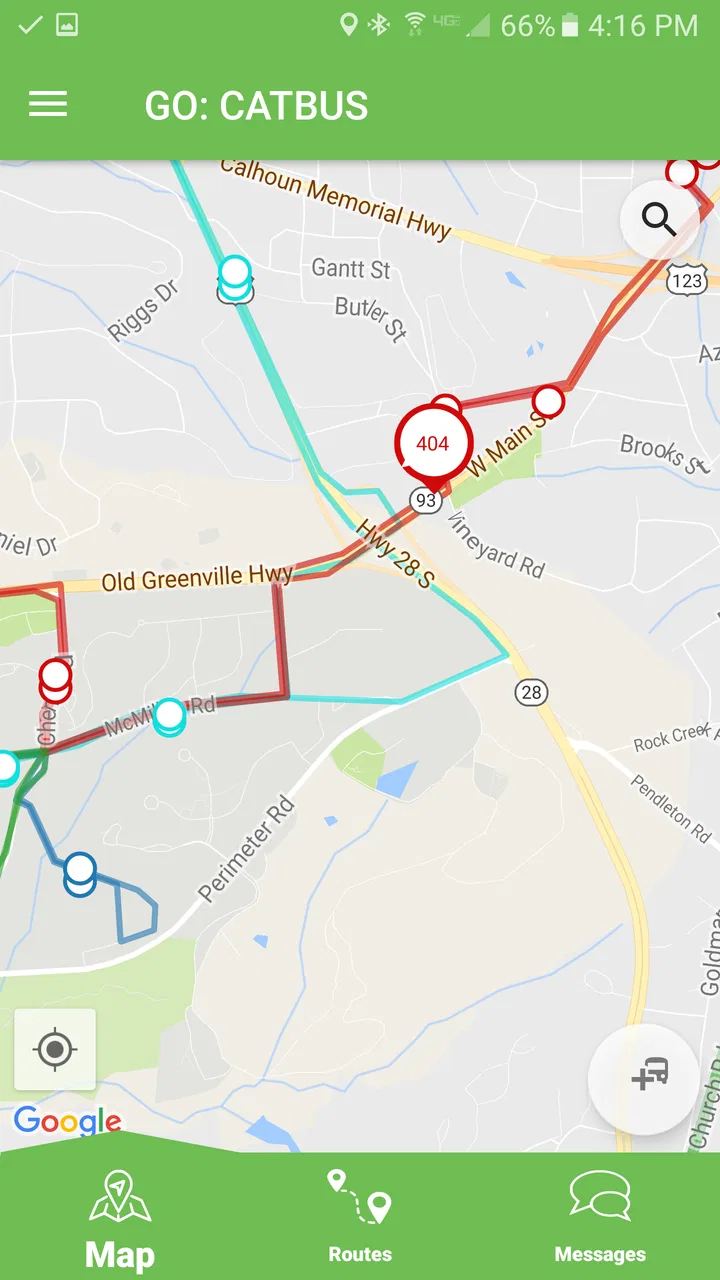
Because this is a location-focused transit tool, the first useful setup step is not changing every option. It is learning how the app presents the services available around you. I would test it on a normal day, compare the displayed route with the stop I actually use, and make sure I understand whether I am looking at a nearby stop, a vehicle position, or a departure estimate.
This is one of the less obvious ways to get better results from a real-time transit app: do a practice check when there is no pressure. If I wait until rain is falling and a bus is due soon, even a small misunderstanding about direction or stop selection can make the app feel unreliable. A short trial trip teaches me more than repeatedly opening the screen without knowing what each result means.
I would also keep the phone’s normal battery and connectivity limits in mind. A live transit tool is most helpful when the device can load current information at the moment I need it. That does not mean I would keep the screen open continuously. I would check, note the practical decision, and close the app rather than treating it like a permanent dashboard.
Coordinating departures without overpromising
For a household, coordination is usually about reducing uncertainty rather than tracking every movement. A parent can check whether it makes sense to walk a child to the stop. Two adults can decide whether to leave together or separately. A caregiver can help an older family member review the route before the trip. In each case, the app supplies a useful starting point for a conversation.
I particularly like the idea of using it before everyone leaves, not only after someone is already waiting outside. If the transit view suggests that the expected vehicle is not close, the household can adjust the departure order or make a backup plan. The important point is to avoid promising another person that a vehicle will definitely arrive at a precise moment. Real-time information improves a decision; it does not make the transit network predictable.
A practical coordination message might include the route name, travel direction, and the stop being used. That is more reliable than sending a screenshot with no explanation, especially if the recipient is unfamiliar with the app. If several routes appear nearby, I would say exactly which one I mean. This is a small communication improvement, but it prevents the common household problem of two people looking at different services and thinking they disagree.
Where it differs from ordinary alternatives
The usual alternatives are a printed timetable, a transit agency website, a general mapping app, or simply waiting at the stop. A timetable is easy to consult and may remain useful when connectivity is poor, but it cannot give the same sense of what is happening right now. A website may contain valuable service details, yet opening a browser and finding the correct page can be slower during a rushed departure.
General mapping apps are often better when I need a complete journey involving walking, transfers, and several modes of transport. They can be the stronger choice for an unfamiliar city or a trip that begins and ends far from a transit stop. Passio GO! feels more focused: I would reach for it when the main question is the location or timing of local transit rather than a full door-to-door itinerary.
Waiting at the stop is the simplest alternative, but it gives me the least information before I leave home. That can be acceptable for a frequent service and a short journey. It is less attractive when a missed vehicle means a long wait, a late arrival, or a difficult handoff between family members. The app earns its place by helping me make that decision earlier.
Age, trust, and everyday independence
The content rating is Everyone, which fits the app’s practical subject matter and makes it suitable for ordinary household use across age groups. Still, an age rating does not teach a child how to travel safely. A younger user may need help identifying the correct stop, understanding direction, and knowing what to do if the displayed information changes.
For an older relative, the main question may be readability and confidence rather than technical ability. I would sit with them once, explain the route view in plain language, and write down the stop name or destination they use most often. After that, the app can encourage independence without requiring the person to solve every transit question alone.
With teenagers, I would use the app as a planning aid rather than a surveillance tool. We could agree that the teenager checks the route before leaving and sends a message if the plan changes. That approach keeps responsibility visible while respecting personal boundaries. Passio GO! can help a family talk about a trip, but trust still comes from the household’s rules and communication.
Limitations I noticed in the overall experience
The focused nature of Passio GO! is also its main limitation. If I want extensive trip planning, walking instructions, fare comparisons, or a broad travel itinerary, I may prefer a general mapping service or the official transit resources for the area. The app is not the only tool I would keep available, especially for a complicated journey with several transfers.
Real-time information can also create false confidence. Seeing a vehicle represented on a map may make a trip feel settled, but the final walk to the stop, boarding conditions, and service changes still matter. I would leave a sensible margin for important appointments and avoid telling a family member that the app guarantees an arrival time.
There is a human limitation as well: every household member may interpret the screen differently. One person may focus on a nearby vehicle while another is looking at the next scheduled departure. That is why I recommend learning the local view together once. The app becomes more useful when everyone uses the same vocabulary for route, direction, and stop.
Who should use it, and who should choose something else?
I would recommend Passio GO! to regular transit riders who want a quick way to inspect current local service and to households that coordinate several daily journeys. It is especially appealing when the difference between leaving now and leaving later affects school drop-offs, work arrivals, or a connection with another family member.
I would be more cautious about recommending it as the only travel tool for visitors, occasional riders, or people planning complex cross-city trips. Those users may benefit more from an app that combines transit with walking directions and full itinerary planning. I would also avoid relying on it alone for a high-stakes appointment unless I had already checked the route and understood the local service pattern.
The app is free, which removes an obvious barrier for a household that wants to try it without committing money. It is available for Everyone and has reached over one hundred thousand installs, while its average rating is around four point two. Those figures suggest a useful level of adoption, but my decision would still depend more on whether the local transit information matches the routes I actually use.
Version, platform expectations, and long-term use
Passio GO! was released on April twenty-first, two thousand seventeen, and the current version is one hundred forty-four. It requires Android six point zero or later. For me, that combination points to an established app that has continued receiving version updates, while the operating-system requirement remains accessible to many older Android devices.
I would still check the device before making it the household’s only transit reference. A shared phone that cannot run the required Android version would need another option, and an older device may not be the most comfortable screen for a person who needs large, clear information. These are practical household considerations rather than reasons to dismiss the app.
On an up-to-date compatible phone, I would keep the app available alongside one backup source, such as a printed route detail or the relevant transit website. That is not because Passio GO! lacks value; it is because travel plans are easier when one temporary technical problem does not leave everyone guessing.
My household verdict
After using Passio GO! as a focused transit companion, I see it as a sensible choice for families and housemates who need a shared understanding of local bus travel without turning the app into a social platform. It helps answer the question that matters immediately: what does the transit situation look like before I leave?
I would recommend it as a coordination aid, not as a replacement for communication, judgment, or a complete journey planner. Set it up during a calm practice trip, teach each user how to confirm the route and direction, and agree on what information is shared. That approach makes the app more useful for children gaining independence, adults managing busy mornings, and older relatives who want a little extra confidence.
My final view is positive but deliberately practical. Passio GO! is free, approachable, and well suited to checking current transit information in an everyday routine. Its limits become clear when a trip is complicated, when the household expects monitoring features, or when someone treats a live estimate as a promise. Used within those boundaries, it can remove a surprising amount of uncertainty from shared travel planning.
FAQs for Passio GO!
01What is Passio GO! and how does it work?
Passio GO! is a real-time passenger information app that provides users with live updates on transit routes, schedules, and vehicle locations. It allows users to track buses or trains in real-time, ensuring they can plan their journeys efficiently. The app uses GPS technology to provide accurate and up-to-date information.
02Is Passio GO! available for both Android and iOS devices?
Yes, Passio GO! is available for download on both Android and iOS platforms. Users can find it on the Google Play Store for Android devices and the Apple App Store for iOS devices. The app is designed to be user-friendly and accessible across various smartphone models.
03Does Passio GO! require an internet connection to function?
Yes, Passio GO! requires an active internet connection to provide real-time updates and accurate transit information. The app uses live data to track vehicles and update schedules, so users should ensure they have a stable internet connection for the best experience.
04Are there any costs associated with using Passio GO!?
Passio GO! is free to download and use. However, standard data rates may apply depending on your mobile carrier, especially if you're using the app over a cellular network. It's recommended to check with your service provider to understand any potential charges.
05What features does Passio GO! offer to enhance the user experience?
Passio GO! offers several features, including real-time vehicle tracking, route planning, and schedule updates. Users can also set notifications for specific routes or stops, ensuring they receive timely alerts about any changes or delays. The app is designed to improve daily commuting by providing reliable transit information.
Pros
- Seamless real-time tracking of activities.
- Intuitive and user-friendly interface.
- Compatible with a wide range of devices.
- Detailed analytics and insights provided.
- Customizable notifications and alerts.
Cons
- Limited offline functionality.
- Battery consumption can be high.
- Requires frequent updates for accuracy.
- Subscription needed for premium features.
- Some features are region-locked.

Passio GO!
Gallery